Collaboration with Varjo

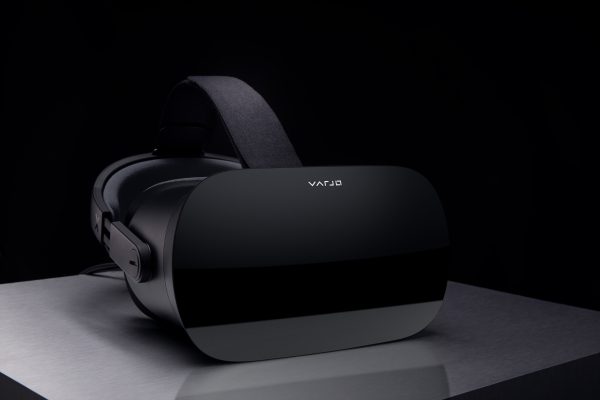
Varjo VR-2

Varjo High-Resolution HMDs

Headsets by the Finish start-up Varjo recently have had a profound impact on the market of business-to-business virtual reality devices. Varjo’s advanced display technology allows viewing immersive environments with uniquely high resolution. It makes the company’s HMDs a great choice for professional design and industrial applications.

We have been working with Varjo for a few months in order to adapt our LPVR driver to work with their headsets. As a result we have recently released a first version of the driver and are ready to deploy it to customers.

LPVR Tracking Technology

Valve Lighthouse is the default tracking technology built into Varjo headsets. This system, in spite of being very suitable for games and single user applications, is limited in its tracking volume and accuracy (mainly reproducibility). In order to allow multi user, large space applications (location-based VR) an alternate tracking system is needed.

With LPVR-CAD for Varjo we allow the combination of Varjo headsets with our tracking technology, based on marker-based inside-out tracking, feature-based inside-out tracking or outside-in tracking such as Advanced Realitime Tracking (ART).

Besides static tracking solutions we also offer support for our LPVR-DUO in-car tracking system.
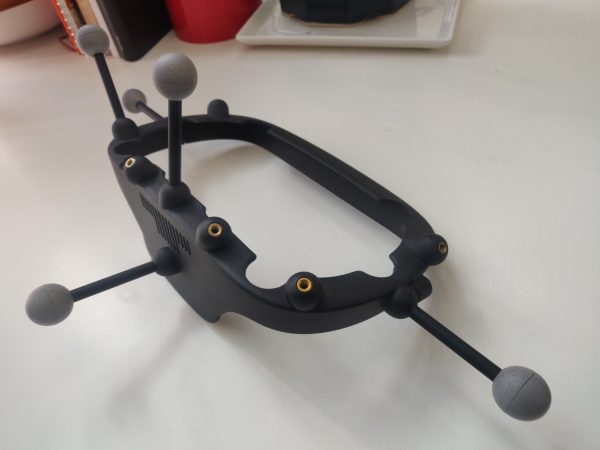
Varjo marker holder top view

Figure 1 – For LPVR outside-in-based tracking, we offer a customized marker holder for Varjo HMDs.
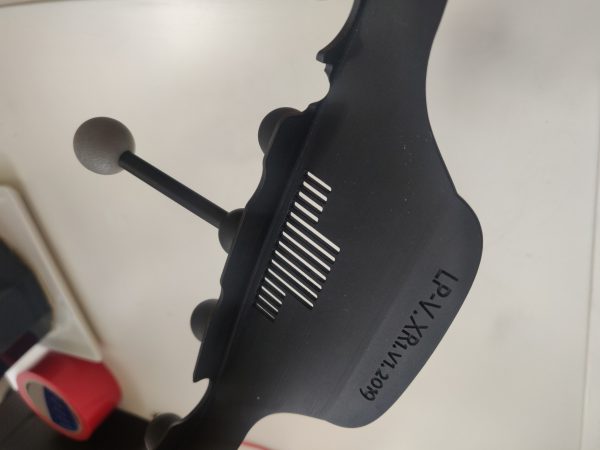
Varjo marker holder detail view

Figure 2 – The marker holder fits all currently available HMDs: VR-1, VR-2 (Pro) and XR-1
LPVR Middleware a Full Solution for AR / VR

Introducing LPVR Middleware

Building on the technology we developed for our IMU sensors and large scale VR tracking systems, we have created a full motion tracking and rendering pipeline for virtual reality (VR) and augmented reality (AR) applications.

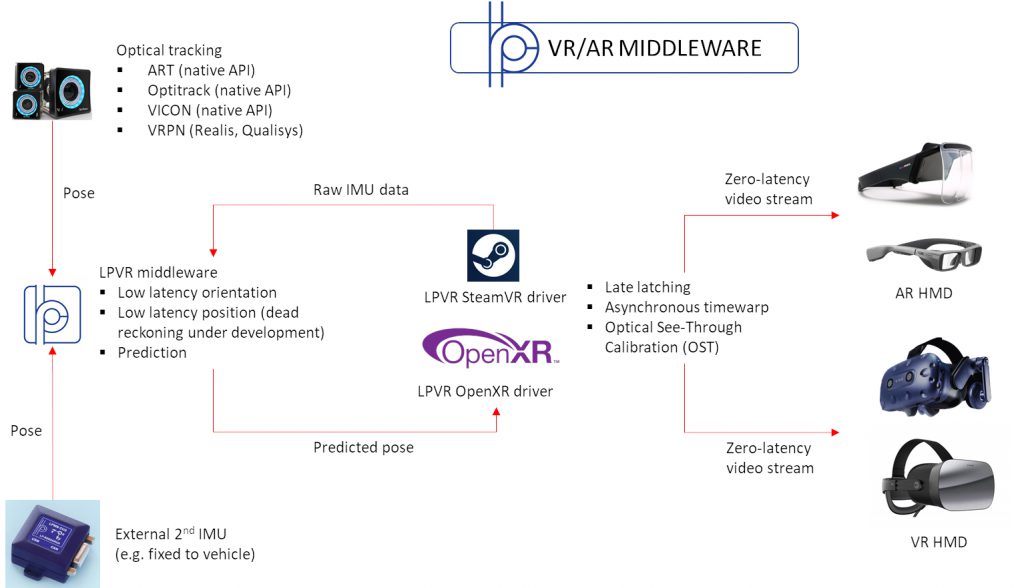
The LPVR middleware is a full solution for AR / VR that enables headset manufacturers to easily create a state-of-the-art visualization pipeline customized to their product. Specifically our solution offers the following features:

    • Flexible zero-latency tracking adaptable to any combination of IMU and optical tracking
    • Rendering pipeline with motion prediction, late latching and asynchronous timewarp functionality
    • Calibration algorithms for optical parameters (lens distortion, optical see-through calibration)
    • Full integration in commonly used driver frameworks like OpenVR and OpenXR
    • Specific algorithms and tools to enable VR / AR in vehicles (car, plane etc.) or motion simulators
Overview of LPVR Middleware Functionality

Application of LPVR Middleware to In-Car VR / AR

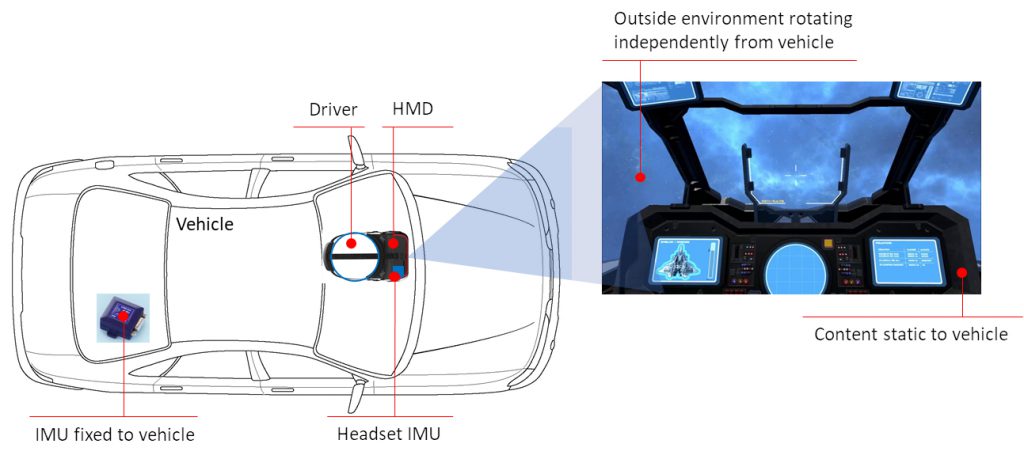
The tracking backend of the LPVR middleware solution for VR and AR is especially advanced in the aspect that it allows the flexible combination of multiple optical systems and inertial measurement units (IMUs) for combined position and orientation tracking. Specifically it enables the de-coupling of the head motion of a user and the motion of a vehicle the user might be riding in, such as a car or airplane.

As shown in the illustration below, in this way the interior of a vehicle can be displayed as static relative to the user, while the scenery in the environment of the vehicle moves with vehicle motion.

Illustration of In-car VR Installation

For any application of augmented reality or virtual reality application in a moving vehicle, this functionality is essential to provide an immersive experience to the user. LP-Research is the industry leader for providing customized sensor fusion solutions for augmented and virtual reality.

If you have interest in this solution, please contact us to start discussing your applications case.

LPMS Operator’s Manual Update

It’s been a long time, but finally we have updated our reference manual to the latest generation of sensors.

The manual is accessible through our documentation & support page or directly from here.

Below is a list of the most important updates, some of which are fixes that customers have asked for for quite a while:

  • Removed hardware specific parts. These are now covered in the quick start manuals.
  • Corrected scaling factors for all non-floating-point data transmission modes.
  • Corrected error in description of reset modes.
  • Moved to-be-deprecated LpSensor detail description to appendix.
  • Added list with APIs for direct sensor programming. OpenZen is to replace LpSensor.

LPMS-B2 iOS SDK: Download & Integration Guide

LPMS-B2, besides Bluetooth classic, also supports Bluetooth 4 / Bluetooth Low Energy. This allows us to connect the sensor to Apple mobile devices such as the iPad, iPhone or the Apple watch. We recently have created a library that enables development of applications supporting LPMS-B2 on these devices.

The library can be accessed via our open source repository.

The repository contains a skeleton application that shows usage of the most basic parts of the library. The library itself is contained in the following files:

LpmsB2.m
LpmsB2.h
LpmsBData.m
LpmsBData.h

A sensor object is initialized and connected using the follwoing code:

#import "LpmsB2.h"
#import "LpmsBData.h"
..
CBPeripheral *peripheral;
CBCentralManager *centralManager;
..
LpmsB2 *myLpmsB2;
myLpmsB2 = [[LpmsB2 alloc] init];
[myLpmsB2 connect:centralManager Address:peripheral];

More coming soon..

LPVR Manual & VIVE Pro Holder Prototype

LPVR Quick Start Guide

We have written a quick start guide for the LP VR system. The guide describes the assembly of the VIVE marker holder and the installation/usage of the LPVR SteamVR driver. The guide at the moment doesn’t contain information about the new VIVE Pro holder, but this will be added later.

Download the guide from here: LpvrGettingStarted20180402.pdf

VIVE Pro Sensor Holder

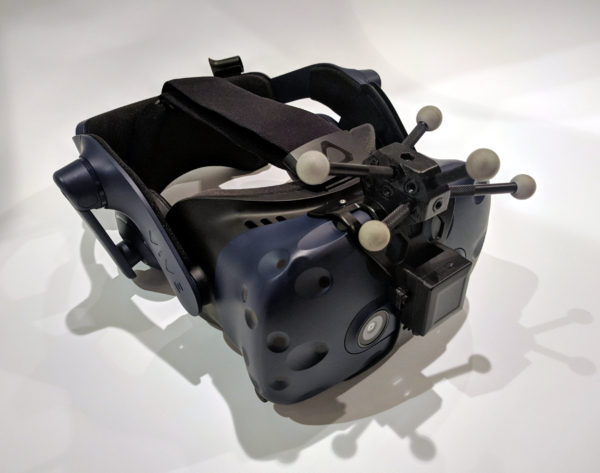
We have been working on the development of a optical marker/sensor holder for the VIVE Pro for a few weeks. It is not completely finished yet, but below is a photo of a prototype.

VIVE Pro with IMU and markers
1 2 3 4 5 6 7