LPVR New Release 4.9.2 – Varjo XR-4 Controller Integration and Key Improvements

New release LPVR-CAD and LPVR-DUO 4.9.2

As it is with software, our LPVR-CAD and LPVR-DUO products for high-fidelity VR and AR need maintenance updates. Keeping up-to-date with the wide range of supported hardware as well as fixing issues that are discovered necessitates a release every now and then. Our latest release, LPVR-CAD 4.9.2 and LPVR-DUO 4.9.2 is no different. This blog post summarizes the changes in the latest version, LPVR-CAD 4.9.2 and LPVR-DUO-4.9.2.
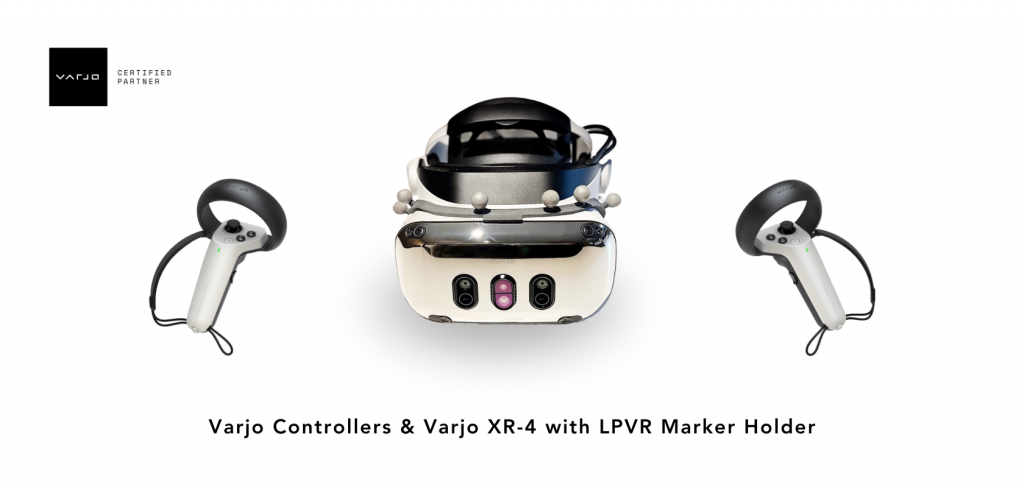
Support for Varjo XR-4 Controllers

The feature with the highest visibility is support for the hand controllers that Varjo ships with the Varjo XR-4 headset. These controllers are tracked by the headset itself, and Varjo Base 4.4 adds an opt-in way of supporting them with LPVR-CAD. Varjo does not enable the controllers by default because the increased USB traffic can negatively affect performance on some systems, and so an LPVR user has to decide whether the added support is worth it on their system. Of course, we also continue supporting the SteamVR controllers together with LPVR-CAD. We detailed their use with the XR-4 in our documentation.

To enable the Varjo controllers in LPVR-CAD, first open Varjo Base. Then navigate to the System tab in Varjo Base. When LPVR-CAD is configured you will find a new input field, depicted below.

Setting its value to “true” will enable controller support, and “false” will disable it. After changing the value, scroll down to the Submit button and click it to effect the change. Varjo also recommends restarting Base after making this change.

Please note that this input is handled by Varjo Base itself, and so this button will also appear in older versions of Varjo Base, for reasons that are too broad to go into here. Providing this support quickly had higher priority to Varjo and us than polish. One issue that can cause confusion is that the Varjo Home screen will not display the controllers, at least in Varjo Base 4.4.0. Unity applications will have to be updated to a recent version of the Varjo plugin. Varjo is working on improving these issues.


Updated Support for JVC HMD-VS1W

An interesting AR headset of see-through type is JVC’s HMD-VS1W. It is a niche product which is typically used in the aeronautical sector. This is a headset which uses Valve tracking with a few custom twists. With a recent software update on their side (version 1.5.0) compatibility with LPVR was broken, but it was easy enough to restore and we have recovered full compatibility.


Various other changes

One of the key points when creating an immersive VR and AR experience is that the motion should appear as smooth as possible. We are therefore constantly refining our algorithms to meet that goal. This release significantly improves the smoothness of rotations, especially for Varjo’s third-generation headsets such as the Varjo Aero and the Varjo XR-3.

We fixed a condition where under some circumstances LPVR-DUO would crash after calibrating the platform IMU. This was related to a multi-threading issue which caused a so-called deadlock in the driver.

We also added support for a global configuration of our SteamVR driver which can be overridden by local users. Since automatic support for this requires major changes to our installers and uninstallers, we decided to postpone enabling this feature by default. Please get in touch if that is something you want to use already.

We often recommended the so-called “freeGravity” feature to our users to improve visual performance in most circumstances. We changed the default for this setting to match the needs for the most common use cases.


*Important note for LPVR-CAD, LPVR-DUO users with Varjo headsets:

Customers who initially purchased LPVR-CAD, LPVR-DUO for the Varjo XR-3 and wish to upgrade to the XR-4 must purchase a separate license upgrade to ensure compatibility. Orders placed before 2024 only cover up to Varjo XR-3 HMD, and orders made from 2024 will cover up to Varjo XR-4 HMD.

We recommend reviewing your maintenance coverage and hardware plans before making upgrades or deploying LPVR across multiple locations. For questions, feel free to contact our support team.

Accurate Mixed Reality with LPVR-CAD and Varjo XR-3

Anchoring Virtual Objects with Varjo XR-3

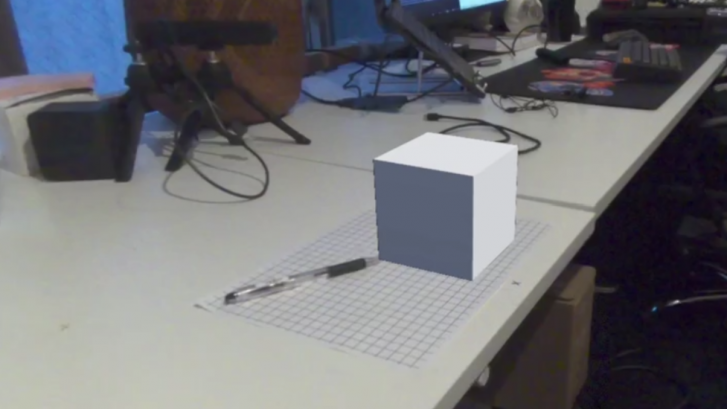
A key aspect of making a mixed reality experience compelling and useful is to correctly anchor virtual content to the real world. An object that’s fixed in its position and orientation (pose) relative to the real world should not change its pose as seen by the user when they’re moving around in the scene wearing the headset. Imagine a simple virtual cube positioned to be sitting on a real table. As the user walks around, this cube should remain in place, regardless from which perspective the user looks at it.

In more detail, correct anchoring of virtual objects to reality depends on the following points:

  1. In order to create correctly aligned content in a mixed reality experience, accurate knowledge of the user’s head pose is essential. We calculate the head pose using LPVR-CAD.
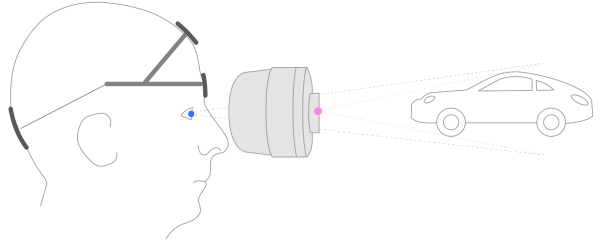
  2. The field of view provided by the cameras and the natural field of view of the human eyes are very different. Appropriate calibration is needed to compensate for this effect. The illustration below shows this inherent problem of video pass-through very clearly. Varjo’s HMDs are factory calibrated to minimize the impact of this effect on the user experience.

To get a better idea how a correct optical see-through (OST) calibration influences mixed reality performance we recommend playing with the camera configuration options in Varjo Lab Tools.

– Image credit: Varjo mixed reality documentation

Functional Testing of MR Performance

Our LPVR solution must at the very least achieve a precision that is satisfactory for our users’ typical applications. Therefore we decided to do a series of experiments to evaluate the precision of our system for mixed reality experiences and how it compares with SteamVR Lighthouse tracking.

We looked at the following configurations to make our evaluation:


# HMD Engine Tracking system
1 Varjo XR-3 Unreal 5.2 LPVR-CAD
2 Varjo XR-3 Unreal 5.2 Lighthouse

1 – LPVR Tracking System

In this scenario we fixed a simple virtual cube on a table top in a defined position and orientation. The cube is the only virtual object in this scenario, everything else is the passed-through live video feed from the HMD cameras. We are tracking the HMD using LPVR-CAD in connection with an ART Smarttrack 3. No markers are used to stabilize the pose of the cube.

Important note: The tracking performance for the mixed reality use case can significantly change if the marker target that is attached to the HMD is not correctly adjusted. Please refer to the LPVR-CAD documentation or contact us for further support.

2 – Lighthouse Tracking System

This scenario is in its basic setup identical to scenario #1, except that we’re using Lighthouse tracking to find the pose of the HMD.

Conclusion

See a table with our preliminary findings below:

LPVR Tracking Lighthouse Tracking
2 2.5
1.5 1.5

– Approximate displacement error on horizontal plane (in cm)

Using the same room setup and test scene, the mixed reality accuracy of LPVR-CAD and Lighthouse tracking is similar. With both tracking systems slight shifts of 1-2cm depending on the head movement can be observed. Good results with LPVR tracking require precise adjustment of the optical target attached to the headset.

Note that our method of estimating the displacement error is rather qualitative than quantitative. With this post, we made a general comparison of LPVR and Lighthouse tracking. A more quantitatively accurate evaluation will follow.

For customers wanting to reduce as much drift as possible, we recommend the use of optical tracking. There may be different results using Varjo XR-4 and other variations on the tracking environment or displayed content, which could warrant further testing in the future.

*We provide complete solutions with cutting-edge tracking systems and content for a variety of headsets. For detailed information on supported HMD models, please reach out to us.

LPVR-AIR for Immersive Collaborative Industrial Design

Wireless Content Streaming

LPVR-AIR is LP-Research’s wireless VR streaming solution. Content is generated on a rendering computer and wirelessly streamed to a VR headset to be displayed. At the same time the pose, orientation and position, of the headset is calculated from tracking data from a camera system and inertial measurements on the headset itself.

The core tracking algorithm of LPVR-AIR is similar to our LPVR-CAD solution. We are combining this established tracking method with wireless data streaming.

This has a few significant advantages:

  • Rendering detailed VR content is computationally too heavy to do all calculations on embedded hardware on the headset itself. Therefore, content needs to be rendered on an external computer and the result is streamed to the headset. LPVR-AIR allows doing this.
  • Designers in eg. the automotive space have their own preference of applications to create content, such as Autodesk VRED. These applications usually don’t run on a headset’s embedded hardware. With LPVR-AIR dsigners can use any application that normally works with a Windows based PC.

Technical Implementation

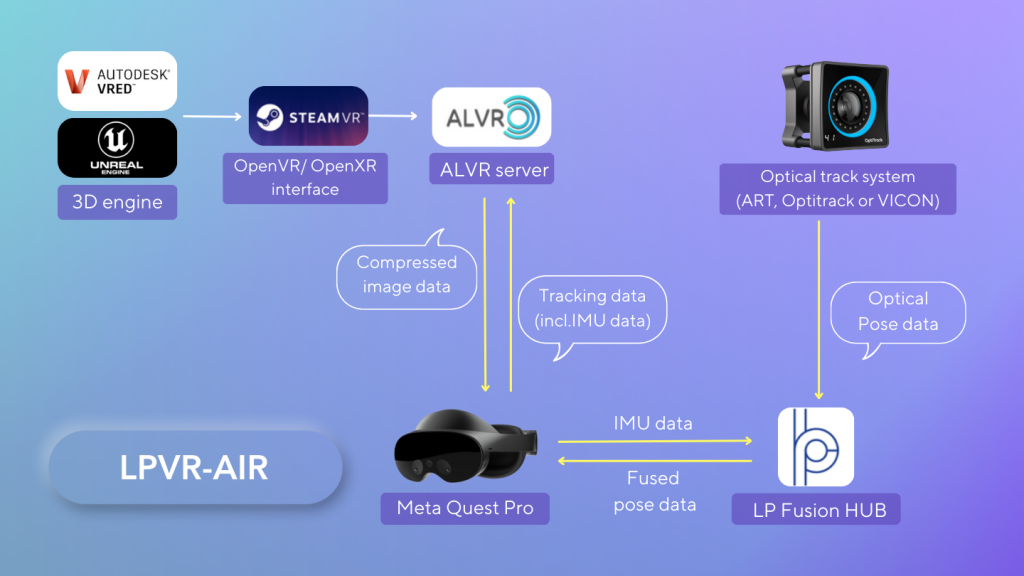
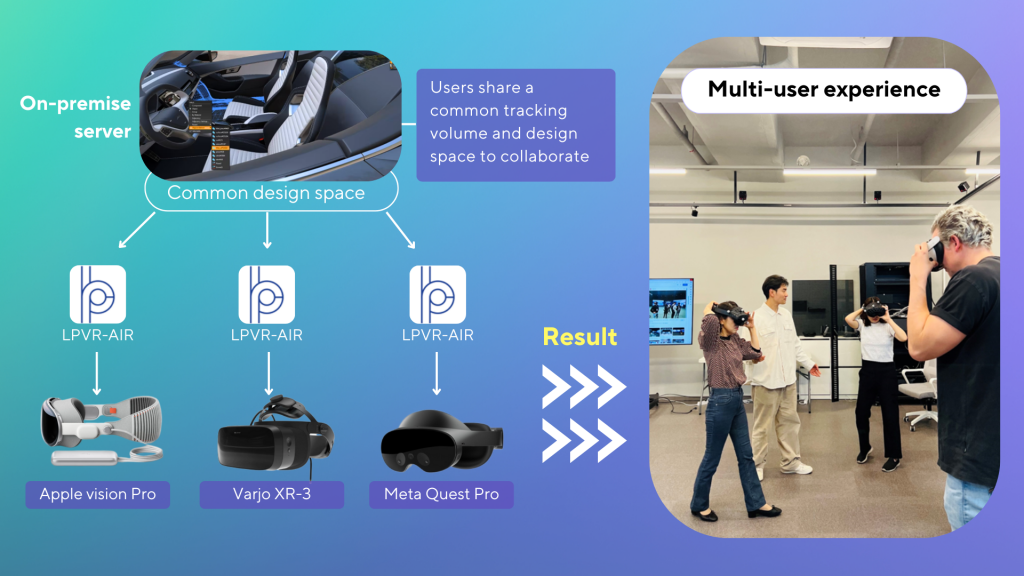
See below a block diagram of how the LPVR-AIR system is implemented. While we in principle support any Android based standalone VR headset, we currently focus on the Meta Quest line of HMDs, specifically Meta Quest Pro and Meta Quest 3.

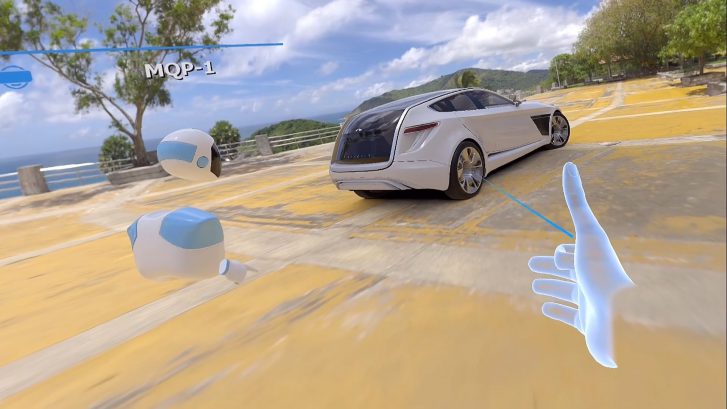
Our solution effectively enables designers to explore a large 3D design space with full high resolution renderings using a lightweight headset. LPVR-AIR even allows for the interaction of several users in a design space. An example of such a use case is shown in the video on the top of this post. Two users in our office in Tokyo, being tracked by LPVR tracking, explore a car design together.

Improved Design Process

This opens new possibilities for automotive, industrial, architecture and many more design applications, leading to increased performance of designers and a higher success rate of their designs. LPVR-AIR is based on the ALVR wireless streaming engine, which we have extended to work with our FusionHub sensor fusion solution.

Long term, the ALVR engine makes it easy for us to support a number of different HMDs, additionally to Meta Quest also the Varjo and eventually the Apple Vision Pro series as shown in the image below. With VRED we have an outstanding rendering solution at the base of LPVR-AIR that allows designers to create photo-realistic content while providing extensive collaboration abilities.

If you would like to move towards immersive and interactive 3D design, don’t hesitate to consult with us and give our LPVR-AIR on-premise collaborative design solution a try!

Immersive Driving Assistance with LPVIZ

How LPVIZ Augments Driving Reality

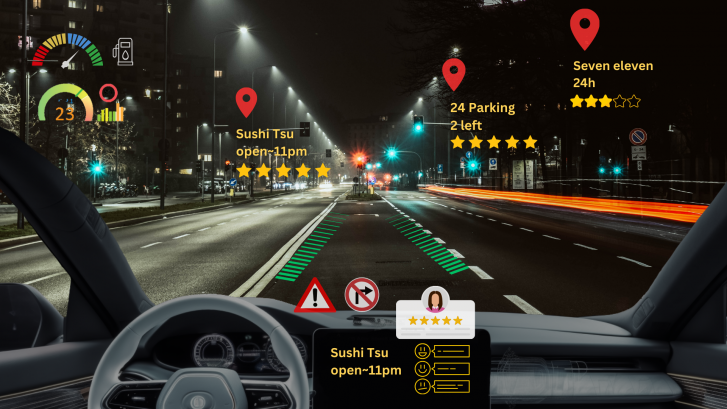
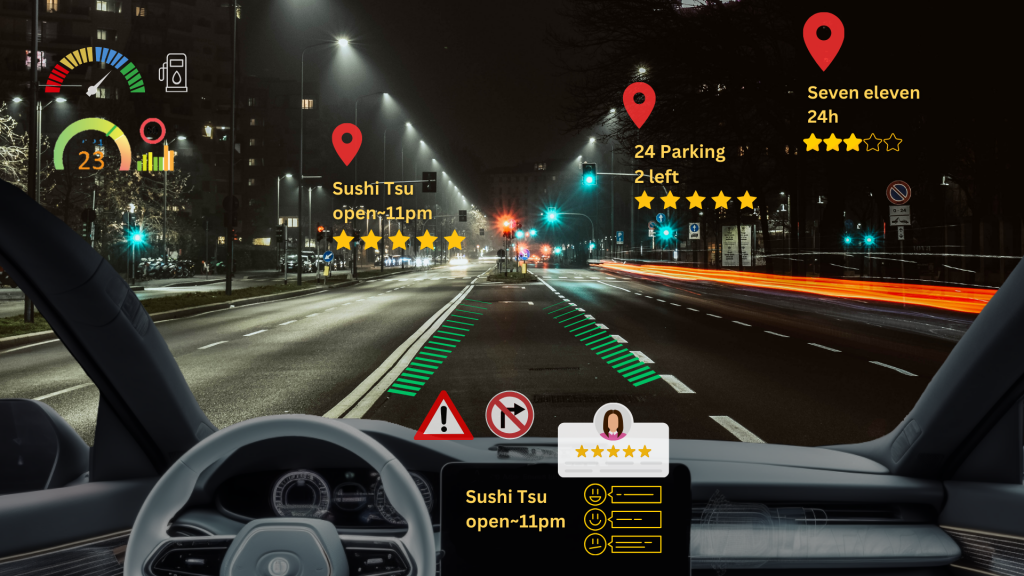
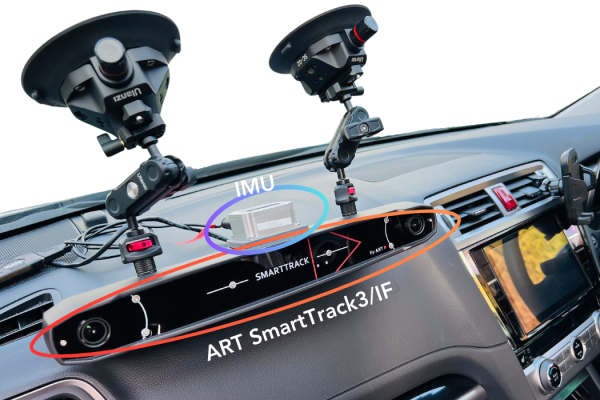
Going beyond a simple screen replacement, LPVIZ is an augmented reality driving assistance solution for the car. It allows displaying related content to a driver or passenger in 3D, superimposed to reality. Content can be placed anywhere inside the car, such as a virtual speedometer over the dashboard, and anywhere outside of the car, such as point-of-interest markers or navigation guidance.

The video on top of this post shows what a drive around the block in Azabujuban, Tokyo with LPVIZ looks like. A virtual dashboard is projected onto the center console of the vehicle. Arrows on the ground show lane guidance to the driver. Red Google Maps-style markers show points of interest. The virtual dashboard stays fixed to the same location in the car, even when the vehicle turns. The navigation arrows move smoothly and the point-of-interest markers are globally anchored.

Perfectly Tuned Components

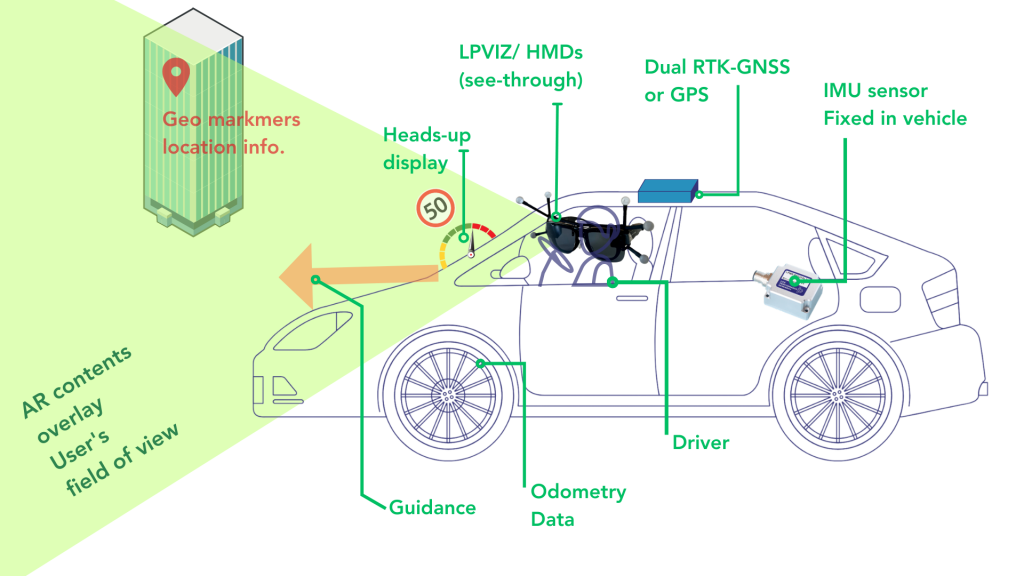
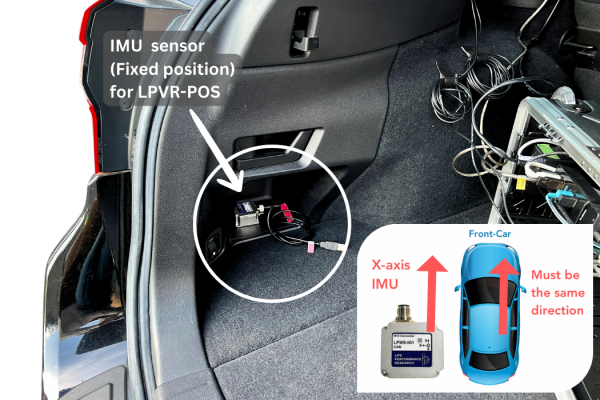
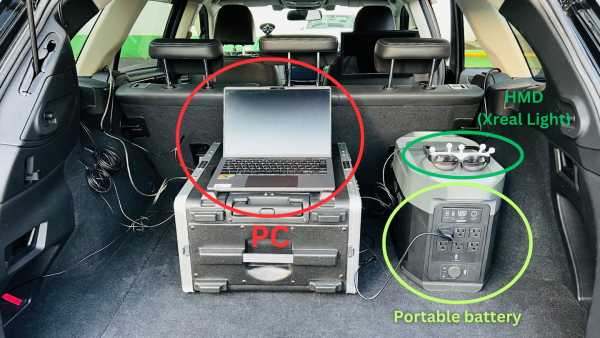
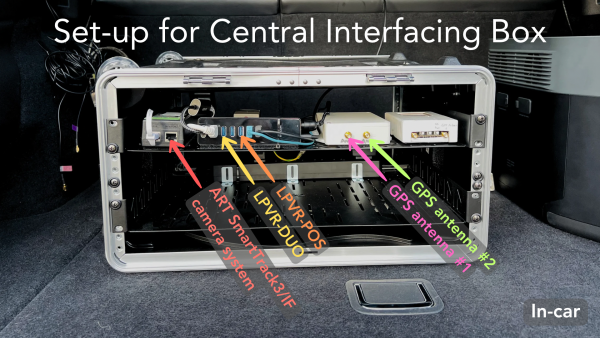
LPVIZ consists of several components that all have to interact perfectly to create a compelling and safe augmentation experience. The below illustration shows a block diagram of how the hardware components are connected.

Accurate tracking is required to display useful content to the driver: the HMD pose in the local car coordinate system and the vehicle pose in a globally anchored frame. Precise calibration of all components of the solution is essential to provide the highest visual fidelity and driver safety. Our LPVIZ product makes all parts of the system available in a compact form factor, ready to be integrated with any vehicle.

The Past, Present and the Future

In the current development stage we’re focusing on the most essential aspects of the solution: displaying a virtual dashboard, navigation information and points-of-interest. While this is our proprietary content, we’re opening our software to work with 3rd party developers to create their own content building on our platform.

Currently we’re offering LPVIZ as a B2B solution for prototyping, design and research. However, we’re working on reducing system complexity to make it work as a consumer facing automotive after-market solution to be released later this year.

Towards a Consumer Product

We are very proud of the progress our team has made in the past months. We’re moving closer to making our vision of an augmented reality driving assistance system a reality for everyone. One very important take-away from our recent developments is that it’s indeed possible to provide real utility to the driver using technology that is readily available. It might still be early days, but we’re edging towards a product that could appeal to a wider consumer market. This is just the beginning.

LPVR-DUO in an Airborne Helicopter

In-Flight VR

Imagine soaring through the skies as a pilot, testing the limits of a helicopter’s capabilities while feeling the rush of wind and turbulence. Now imagine that you don’t see the real world outside and the safe landing pad that your helicopter is approaching but a virtual reality (VR) scene where you are homing in on a ship in high seas. The National Research Council Canada (NRC) and Defence Research and Development Canada (DRDC) have brought this experience to life with their groundbreaking Integrated Reality In-Flight Simulation (IRIS).

IRIS is not your ordinary simulator; for one, it’s not sitting on a hexapod, it’s airborne. It’s a variable-stability helicopter based on the Bell 412 that can behave like other aircraft and can simulate varying weather conditions; combine that with a VR environment and you have a tool that allows safely training operations in the most adverse conditions. In particular it is used for Ship Helicopter Operating Limitations (SHOL) testing.

Mission-Critical Application with LPVR-DUO

The LPVR-DUO system is what makes VR possible on this constantly moving platform. This cutting-edge AR/VR tracking system seamlessly merges the inertial measurements taken by the headset with the helicopter’s motion data and a camera system mounted inside the cabin to provide the correct visuals to the pilot. The challenges of using cameras to track the VR headset inside the tight environment of the helicopter while lighting conditions are ever-changing are overcome by using an ART SmartTrack 3 system. This system follows an arrangement of reflective markers attached to the pilot’s helmet. The VR headset is attached to the helmet in such a way that the pilot can wear it as if it were a pair of night vision goggles. Put together, this allows displaying a virtual world to the pilot, even in the most extreme maneuvers.

To ensure an authentic experience, the IRIS system incorporates real-time turbulence models, meticulously crafted from wind tunnel trials. These turbulence effects are seamlessly integrated into the aircraft’s motion and into the VR scene, providing pilots with precise proprioceptive and vestibular cues. It’s a symphony of technology and innovation in the world of aviation testing.

In-Cockpit Implementation

The optical tracking system relies on highly reflective marker targets on the helmet to track movement in three dimensions. Initially, only five markers were installed, strategically placed for optimal tracking. But the pursuit of perfection led NRC to create custom 3D-printed low-reflectivity helmet molds, allowing them to mount a dozen small passive markers. This significantly improved tracking reliability in various lighting conditions and allowed for a wider range of head movement.

Recently, NRC put this remarkable concept to the test with actual flight trials. The response from pilots was nothing short of exhilarating. They found the system required minimal adaptation, exhibited no noticeable lag, and, perhaps most impressively, didn’t induce any motion sickness. Even the turbulence effects felt incredibly realistic. Surprisingly, the typical VR drawbacks, such as resolution and field of view limitations, had minimal impact, especially during close-in shipboard operations. It’s safe to say that IRIS has set a new standard for effective and immersive aviation testing.

Publication of Results

The NRC team presented their results at the Vertical Flight Society’s 79th Annual Form in two papers [1] and [2] and they also have a blog post on their site.

NOTE: Image contents courtesy of Aerospace Research Centre, National Research Council of Canada (NRC) – Ottawa, ON, Canada

1 2 3 4 15