Blog

FusionHub – Sensor Fusion Operating System

In the past years our team at LP-RESEARCH has worked on a number of customer projects that required us to customize our sensor fusion algorithms for a specific application.

Such customization usually doesn’t include significant changes to our existing filter algorithms, but in most cases only warrants changes to input/output interfacing, specialized extensions to the core functionality.

Our own products such as the LPMS inertial measurement units, the LPVR virtual and augmented reality tracking system series and LPVIZ are based to a large extent on the same fundamental algorithms, but with different sensor inputs and different data output interfaces.

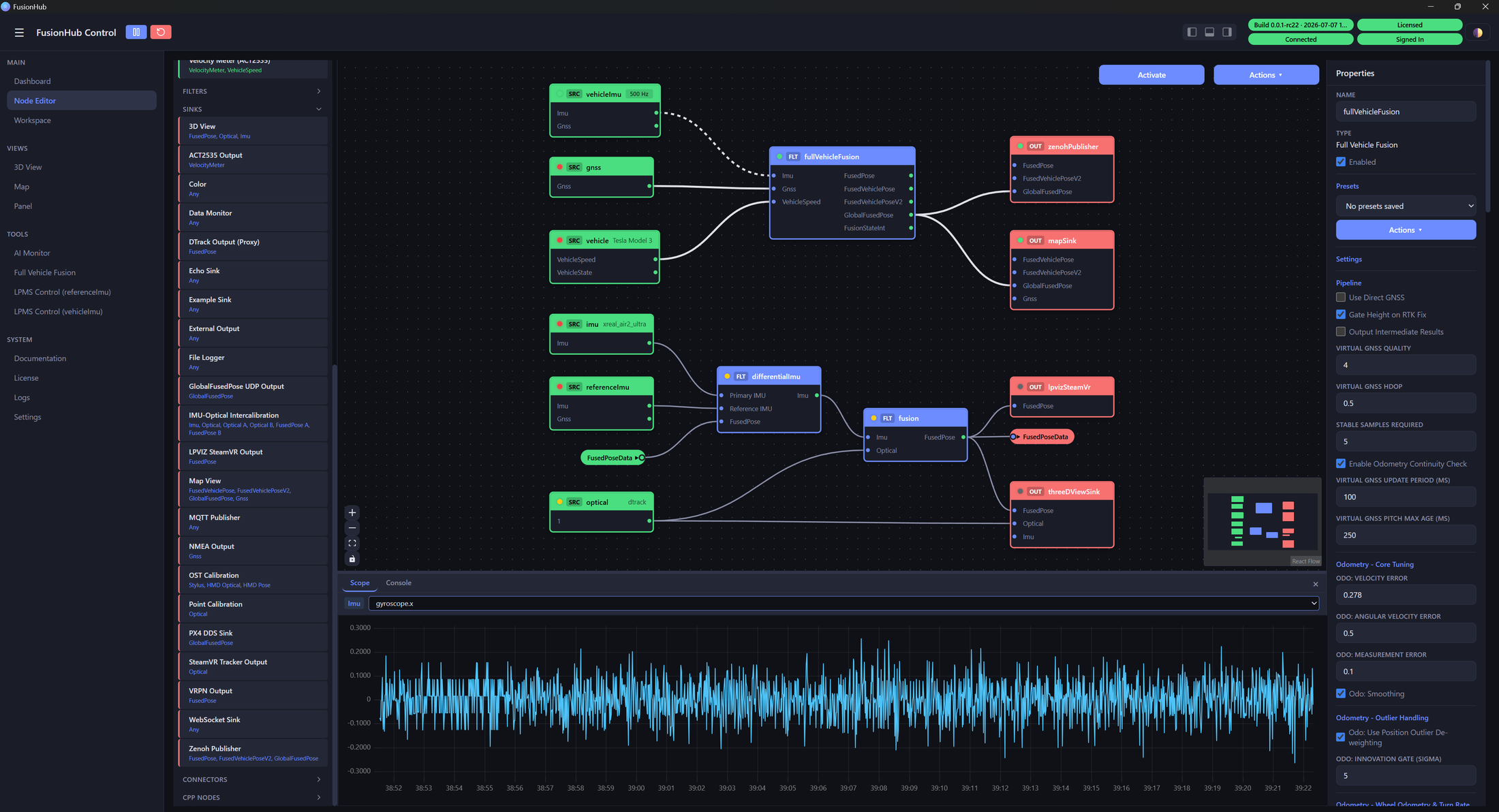
For this reason we decided to develop a modular platform that would allow us to create a graph of nodes, each node with a specific functionality as either:

  • Sensor data source (Gyroscope source, GPS etc.)
  • Filter algorithm (IMU-optical filter, odometry-GPS filter etc.)
  • Output sinks (File writer, websocket output, VRPN output etc.)

Modular Platform

This modular platform we call the FusionHub or sensor fusion operating system (SFOS) as it creates an end-to-end solution for applications that need a high performance and flexible sensor input/output and filtering system. FusionHub is platform independent and can run on Windows, Linux and Android. We are also working on a port to Apple’s VisionOS.

One might argue that a very simlar solution exists in the form of the Robot Operating System (ROS). ROS is a powerful platform, but it is relatively large in the amount of base components that it needs to run.

With FusionHub, we rely on the ZeroMQ protocol and Google’s Protocol Buffers for the communication of our nodes. This keeps the application light weight and independent from any other software stack or platform.

Apart from proprietary external libraries that might be needed to connect to certain sensor systems, FusionHub is a standalone application. It easily runs even on embedded hardware systems such as the Meta Quest virtual reality display series.

Easy Configuration

The components of a FusionHub graph are configured using a simple JSON script. For example a sensor input from one of our LPMS-IG1 IMUs is configured as shown below:

"imu": {
	"outEndpoint": "inproc://imu_data_source",
	"settings": {
		"autodetectType": "ig1"
	},
	"type": "OpenZen"
}  

An IMU-optical sensor fusion node would be configured similar to the below script:

"fusion": {
	"dataEndpoint": "inproc://fusion_output",
	"inputEndpoints": [
		"inproc://optical_data_source",
		"inproc://imu_data_source"
	],
	"settings": {
		"SensorFusion": {
			"alignment": {
				"w": 0.464394368797396,
				"x": -0.545272191516426,
				"y": 0.5236543865322006,
				"z": 0.46130487841960544
			},
			"orientationWeight": 0.005,
			"predictionInterval": 0.01,
			"sggPointsEachSide": 5,
			"sggPolynomialOrder": 5,
			"tiltCorrection": null,
			"yawWeight": 0.01
		}
	},
	"type": "ImuOpticalFusion"
}

Each node contains input and output endpoints, or one of the two for source and sink nodes, that allow other nodes to connect to them. Connections can be limited to inside the application (“inproc://..”) or also be accessible from outside the application (“tcp://..”). This allows for constructing node networks that run on distributed machines. For example one computer could acquire data from a specific sensor and another computer could apply a sensor fusion algorithm to the incoming data.

This is also a simple way how additional nodes developed by 3rd parties can communicate with or via the FusionHub.

We have so far created the follwing node components:

Inputs

  • LPMS input node- Optical tracking system input node (ART, Optitrack, VICON, Antilatency)
    • (RTK-)GPS input nodes (NMEA, RTCM)
    • Car odometry via CAN bus input node

Outputs

  • File writer node
  • VRPN output node
  • Websocket output node

Filters

  • IMU-optical fusion node (for LPVR systems)
  • GPS-odometry fusion node (for car navigation)
  • RTK-GPS-odoemtry-IMU fusion node (for car navigation)

Future Outlook

With great success we’ve deployed FusionHub for our own products as well as several customer projects.

While our collection of node components and the range of applications for FusionHub is growing, we spend significant development resources on creating testing frameworks that guarantee the performance and robustness of FusionHub. As the application of FusionHub in our LPVIZ driving assistance system is mission critical, reliability and redundancy of our core framework is essential.

In the future we’re looking to connect FusionHub with our internal IoT solution LPIOT to open up access to our core algorithm to large numbers of sensor devices in parallel. Furthermore we are working with machine learning-focused company Archetype AI to give deeper inteligence to this solution.

See further information about how to use FusionHub in the FusionHub documentation.

Accurate Mixed Reality with LPVR-CAD and Varjo XR-3

Anchoring Virtual Objects with Varjo XR-3

A key aspect of making a mixed reality experience compelling and useful is to correctly anchor virtual content to the real world. An object that’s fixed in its position and orientation (pose) relative to the real world should not change its pose as seen by the user when they’re moving around in the scene wearing the headset. Imagine a simple virtual cube positioned to be sitting on a real table. As the user walks around, this cube should remain in place, regardless from which perspective the user looks at it.

In more detail, correct anchoring of virtual objects to reality depends on the following points:

  1. In order to create correctly aligned content in a mixed reality experience, accurate knowledge of the user’s head pose is essential. We calculate the head pose using LPVR-CAD.
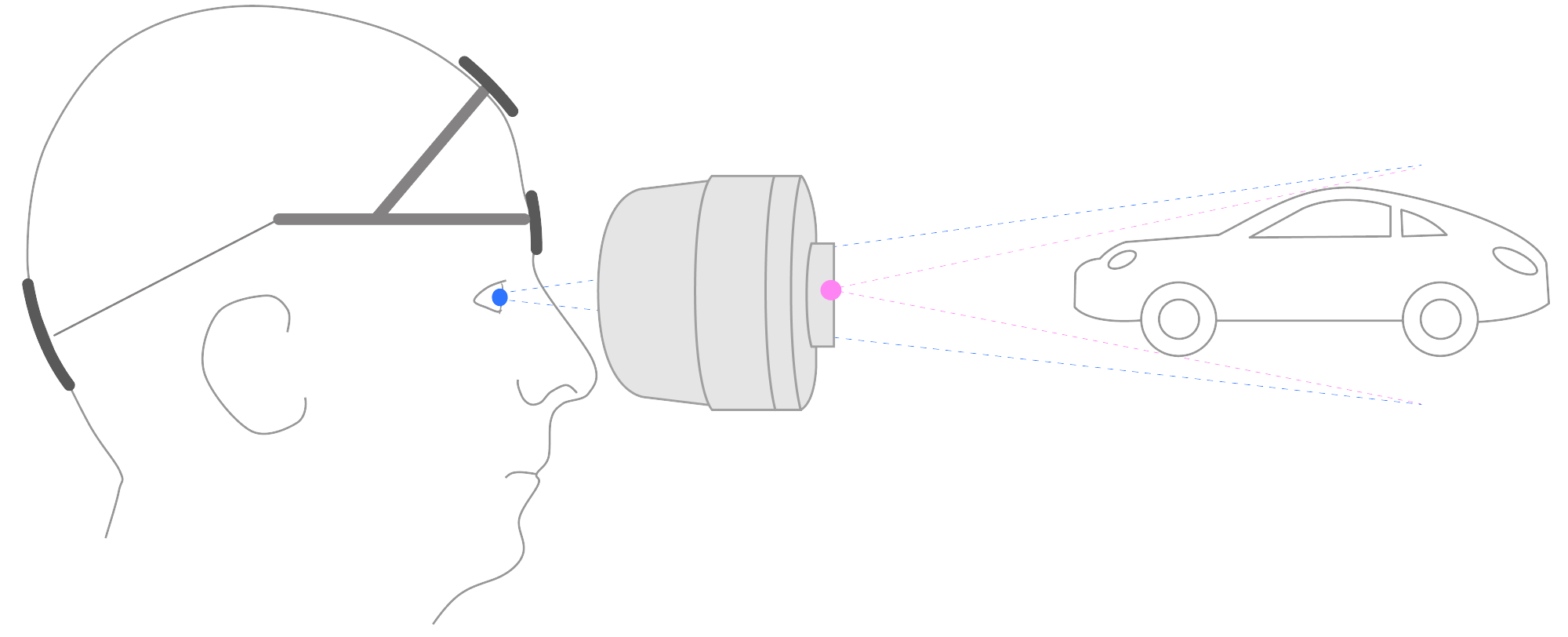
  2. The field of view provided by the cameras and the natural field of view of the human eyes are very different. Appropriate calibration is needed to compensate for this effect. The illustration below shows this inherent problem of video pass-through very clearly. Varjo’s HMDs are factory calibrated to minimize the impact of this effect on the user experience.

To get a better idea how a correct optical see-through (OST) calibration influences mixed reality performance we recommend playing with the camera configuration options in Varjo Lab Tools.

– Image credit: Varjo mixed reality documentation

Functional Testing of MR Performance

Our LPVR solution must at the very least achieve a precision that is satisfactory for our users’ typical applications. Therefore we decided to do a series of experiments to evaluate the precision of our system for mixed reality experiences and how it compares with SteamVR Lighthouse tracking.

We looked at the following configurations to make our evaluation:

#HMDEngineTracking system
1Varjo XR-3Unreal 5.2LPVR-CAD
2Varjo XR-3Unreal 5.2Lighthouse

1 – LPVR Tracking System

In this scenario we fixed a simple virtual cube on a table top in a defined position and orientation. The cube is the only virtual object in this scenario, everything else is the passed-through live video feed from the HMD cameras. We are tracking the HMD using LPVR-CAD in connection with an ART Smarttrack 3. No markers are used to stabilize the pose of the cube.

Important note: The tracking performance for the mixed reality use case can significantly change if the marker target that is attached to the HMD is not correctly adjusted. Please refer to the LPVR-CAD documentation or contact us for further support.

video

2 – Lighthouse Tracking System

This scenario is in its basic setup identical to scenario #1, except that we’re using Lighthouse tracking to find the pose of the HMD.

video

Conclusion

See a table with our preliminary findings below:

LPVR TrackingLighthouse Tracking
22.5
1.51.5

– Approximate displacement error on horizontal plane (in cm)

Using the same room setup and test scene, the mixed reality accuracy of LPVR-CAD and Lighthouse tracking is similar. With both tracking systems slight shifts of 1-2cm depending on the head movement can be observed. Good results with LPVR tracking require precise adjustment of the optical target attached to the headset.

Note that our method of estimating the displacement error is rather qualitative than quantitative. With this post, we made a general comparison of LPVR and Lighthouse tracking. A more quantitatively accurate evaluation will follow.

For customers wanting to reduce as much drift as possible, we recommend the use of optical tracking. There may be different results using Varjo XR-4 and other variations on the tracking environment or displayed content, which could warrant further testing in the future.

*We provide complete solutions with cutting-edge tracking systems and content for a variety of headsets. For detailed information on supported HMD models, please reach out to us.

LPVR-AIR for Immersive Collaborative Industrial Design

video

Wireless Content Streaming

LPVR-AIR is LP-Research’s wireless VR streaming solution. Content is generated on a rendering computer and wirelessly streamed to a VR headset to be displayed. At the same time the pose, orientation and position, of the headset is calculated from tracking data from a camera system and inertial measurements on the headset itself.

The core tracking algorithm of LPVR-AIR is similar to our LPVR-CAD solution. We are combining this established tracking method with wireless data streaming.

This has a few significant advantages:

  • Rendering detailed VR content is computationally too heavy to do all calculations on embedded hardware on the headset itself. Therefore, content needs to be rendered on an external computer and the result is streamed to the headset. LPVR-AIR allows doing this.
  • Designers in eg. the automotive space have their own preference of applications to create content, such as Autodesk VRED. These applications usually don’t run on a headset’s embedded hardware. With LPVR-AIR dsigners can use any application that normally works with a Windows based PC.

Technical Implementation

See below a block diagram of how the LPVR-AIR system is implemented. While we in principle support any Android based standalone VR headset, we currently focus on the Meta Quest line of HMDs, specifically Meta Quest Pro and Meta Quest 3.

Our solution effectively enables designers to explore a large 3D design space with full high resolution renderings using a lightweight headset. LPVR-AIR even allows for the interaction of several users in a design space. An example of such a use case is shown in the video on the top of this post. Two users in our office in Tokyo, being tracked by LPVR tracking, explore a car design together.

Improved Design Process

This opens new possibilities for automotive, industrial, architecture and many more design applications, leading to increased performance of designers and a higher success rate of their designs. LPVR-AIR is based on the ALVR wireless streaming engine, which we have extended to work with our FusionHub sensor fusion solution.

Long term, the ALVR engine makes it easy for us to support a number of different HMDs, additionally to Meta Quest also the Varjo and eventually the Apple Vision Pro series as shown in the image below. With VRED we have an outstanding rendering solution at the base of LPVR-AIR that allows designers to create photo-realistic content while providing extensive collaboration abilities.

If you would like to move towards immersive and interactive 3D design, don’t hesitate to consult with us and give our LPVR-AIR on-premise collaborative design solution a try!

Your cart

Subtotal$0.00
Tax + shipping calculated at checkout.

Page history

Asset library